In this update, you’ll find high-level summaries of the latest platform features and enhancements. We’ve also included links to Knowledge Base articles for detailed instructions on how to make the most of these updates.
Unless otherwise noted, the following features support Perceptyx Platform 2.5 and are available based on permissions and subscriptions purchased.
Come explore the new features in our platform workspaces:
We’d love to hear your thoughts on these new features and improvements. Share your feedback with us!
User Roles: Admins
Required Subscription(s): Platform, Lifecycle
Lifecycle events now support a resurvey feature, allowing employees to participate in the same lifecycle event more than once during their employment journey. This makes it easier to gather feedback for recurring events like rehire, re-exit, work anniversaries, and other ongoing listening events.
What’s New
Resurvey option for lifecycle events: Admins can enable the Resurvey Employees toggle in the Invite phase when building a lifecycle event.
Exclusion window control: Admins define the number of days that must pass before an employee can receive another invite to the same lifecycle event.
Support for recurring milestones: Employees who re-enter a lifecycle stage (such as rehire or multiple anniversaries) can receive a new invite when they become eligible again.
Independent survey instances: Each lifecycle occurrence is treated as a separate survey instance, even if the same employee participates multiple times.
Accurate reporting across events: Every lifecycle instance is captured and reported separately, preserving the correct demographics and timeline for each occurrence.
Better scalability for ongoing programs: Organizations can run continuous onboarding, exit, and milestone strategies without participant record conflicts.
How it Works
When Resurvey Employees is enabled, admins configure an exclusion window that determines how soon an employee can be invited again.
Employees who become eligible outside of the exclusion window receive a new invitation to the lifecycle event.
Employees within the exclusion window are not reinvited.
Prior completion of earlier invitations is not required for eligibility.
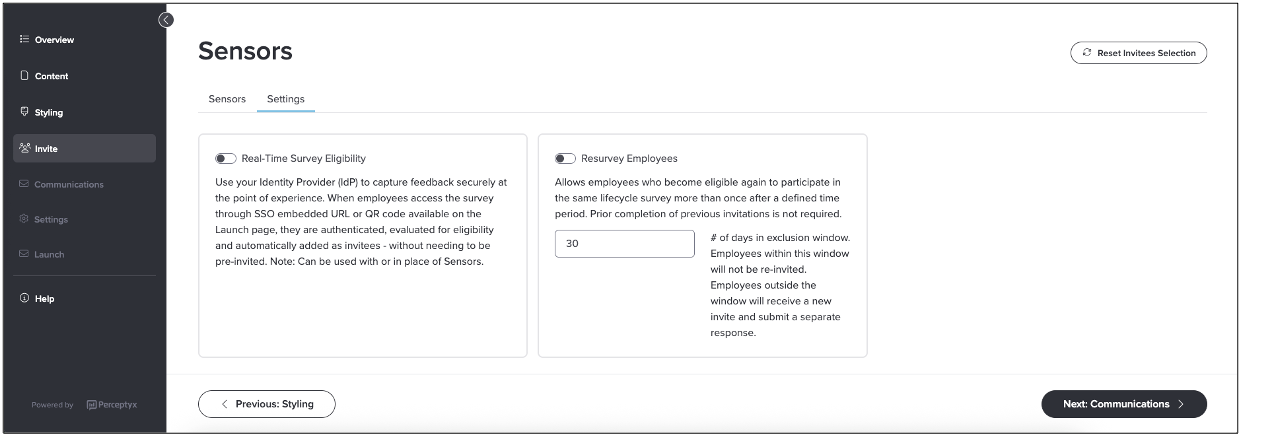
Each eligible occurrence generates a new lifecycle survey instance. If the same employee participates multiple times, each instance is processed and reported independently.
What this looks like for participants of various invite methods:
Historical surveys will be closed automatically when a participant is invited again.
Regardless of entry method (SSO, PIN, or Unique links) participants who have been invited to participate more than once will always be routed to the most recent survey instance.
Resurvey also works with real-time eligibility. When both features are enabled, the system checks the exclusion window when an employee attempts to access the event and routes them to their current survey or creates a new survey instance as needed.
For more details and step-by-step instructions, see the Add Participants | Point-In-Time & Lifecycle Knowledge Base article.
➡️ Hide or Unhide Live Listening Event Content
User Roles: Admins, Creators
Required Subscription(s): Platform, Point-In-Time/Lifecycle
Live listening event editing now includes the ability to hide or unhide event questions, demographic questions, and miscellaneous text. This enhancement gives Admins and Creators more flexibility to refine events in progress without interrupting the respondent experience or relaunching the event. Any responses received for a question prior to being hidden are preserved and available in reporting.
What’s New
Hide or unhide content for live events: Questions, demographic questions, and miscellaneous text can be hidden from or restored to the respondent experience at any time.
Greater control without disruption: Update what respondents see in real time without pausing or relaunching the event.
Logic preservation: Hiding a question automatically hides any dependent questions tied to conditional logic.
How it Works
Admins and Creators can manage the visibility of event content directly within the live editing experience.
When content is hidden, it is removed from the respondent experience but remains available in the Event Builder for future use.
If a hidden question uses conditional logic, any dependent questions are also hidden to maintain integrity.
All updates can be reviewed before being applied, providing control over when changes take effect in the live event.
Responses received before a question is hidden are preserved and available in reporting.
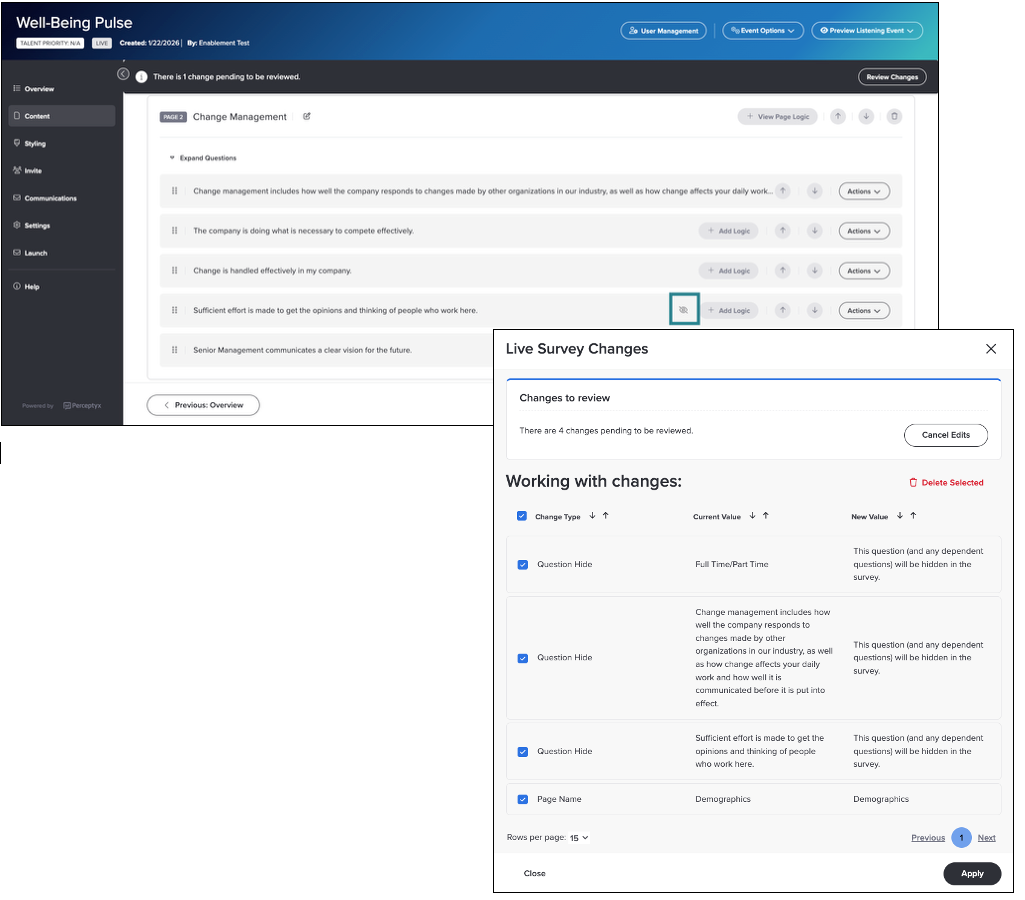
For more details and step-by-step instructions, see the Manage Your Live Listening Event | Point-In-Time & Lifecycle Knowledge Base article.
➡️ Demographic-Based PIN Codes
User Roles: Admins, Creators
Required Subscription(s): Platform, Point-In-Time/Lifecycle
Organizations can now define custom PIN fields using any unique demographic value from their employee data file, making it easier for more employees to participate in listening events. In addition to email address and employee ID, you can use familiar identifiers such as worker ID or badge number to authenticate respondents.
What’s New
Flexible PIN configuration: Use demographic-based identifiers as PINs for event access.
Improved accessibility for frontline workers: Enable participation for employees who may not have email access or readily use employee IDs.
Consistent login experience: Provide familiar and easy-to-remember identifiers across events.
Seamless availability: Once configured, available PIN options can be selected when setting up PIN-based access for events.
How it Works
This feature expands PIN-based authentication by allowing organizations to define identifiers that align with how employees access systems in their day-to-day work.
Custom PIN setup: One or more demographic fields can be configured as PINs and labeled for use across the platform. This setup is completed during onboarding for new customers or by request through Customer Care for existing customers
Event setup: When enabling a PIN page, select the identifier you want to use for that event.
Participant access: Respondents enter their assigned identifier to securely access the event without an email invitation.
Flexible distribution: Share the PIN page using a URL or QR code for easy access across devices.
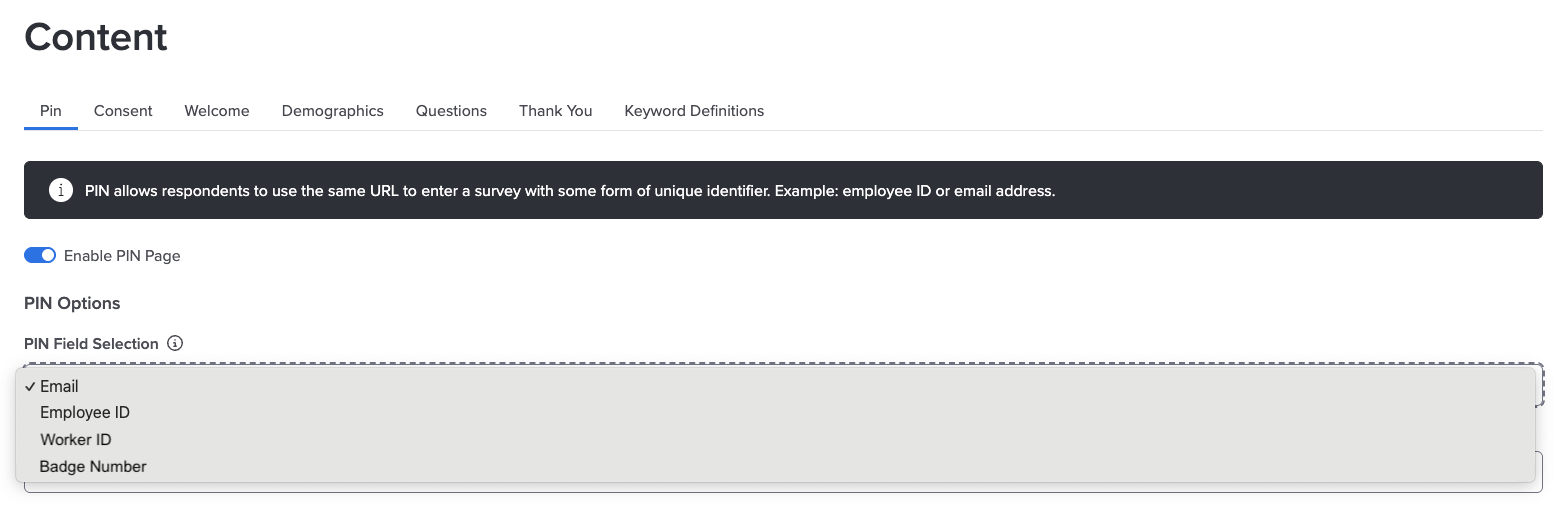
For more details and step-by-step instructions, see the Enable and Customize Event Pages | Point-In-Time & Lifecycle Knowledge Base article.
User Roles: Reporting Users
Required Subscription(s): Platform
The inactivity session timeout for Advanced Reporting sites has been adjusted to 30 minutes to support enhanced security around your reporting data.
What’s New
Reporting sessions automatically expire after 30 minutes of inactivity.
The update applies across all Advanced Reporting environments.
How it Works
If a session remains inactive for more than 30 minutes, it automatically expires. When the user next attempts to interact with the reporting site, they are redirected to log in again.
This update helps protect sensitive reporting information while maintaining a consistent and predictable experience.
➡️ Narrative Analysis Agent Now Generally Available
User Roles: Event Admins, Creators
Required Subscription(s): Platform, Point-In-Time, Narrative Analysis Agent
Narrative Analysis Agent is now generally available, providing a conversational, AI-powered approach to analyzing open-ended feedback. With support for both Advanced Reporting and Analytics Studio, you can explore comment data more flexibly and uncover deeper insights using natural-language questions.
What’s New
General availability: Narrative Analysis Agent is now broadly available for eligible organizations (subscription add-on required).
Expanded access across reporting experiences:
Available in Advanced Reporting for self-led events
Available in Analytics Studio for Perceptyx-led events
Conversational analysis experience: Ask natural-language questions to explore themes, compare groups, and uncover insights.
Deeper, more flexible insights: Go beyond predefined summaries to investigate the “why” behind employee feedback.
How it Works
Narrative Analysis Agent enables a flexible approach to comment analysis by allowing users to explore feedback through conversation rather than predefined filters or prompts.
Natural-language exploration: Ask questions about your comment data and receive tailored, AI-generated responses.
Iterative analysis: Refine results through follow-up questions to dig deeper into themes, patterns, or specific groups.
Context-aware insights: The agent analyzes comment text along with relevant metadata to provide more nuanced responses.
Access by event type: Narrative Analysis Agent is available in Advanced Reporting for self-led events and in Analytics Studio for managed events.
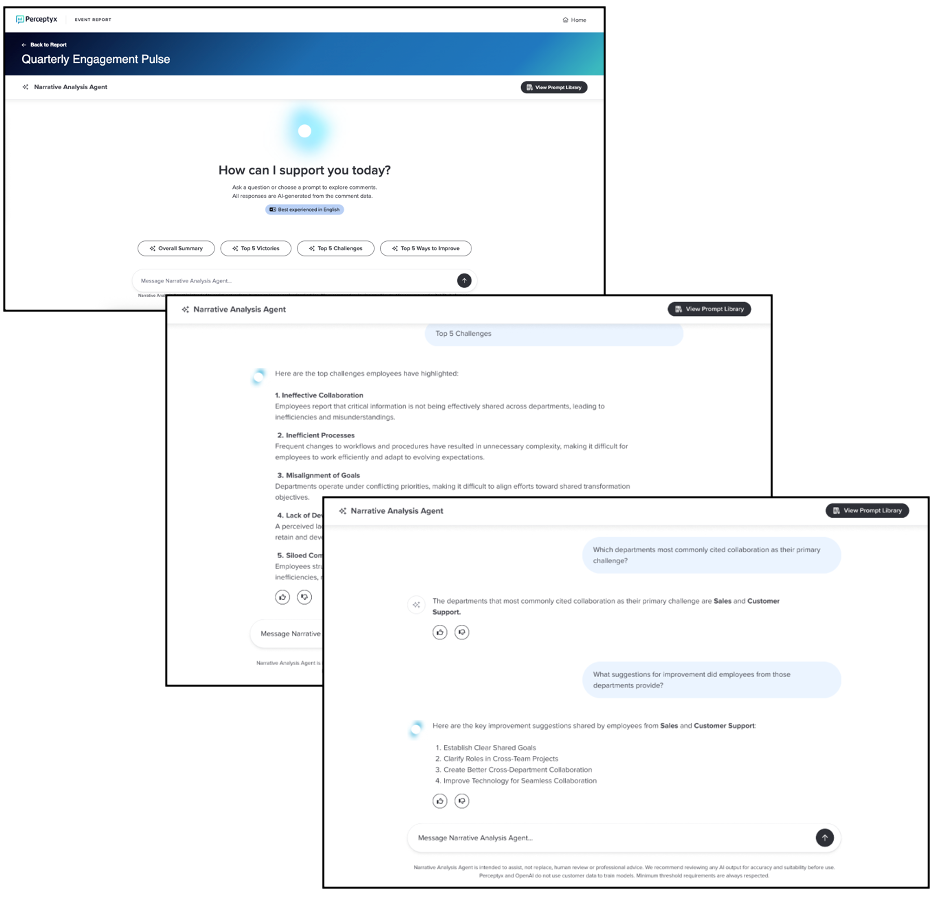
Getting Started
Narrative Analysis Agent must be enabled at the subscription level by Perceptyx. Once enabled, it is automatically available for new closed Point-In-Time listening events. Your Platform Administrator can choose to disable the agent for individual listening events or enable it for previous listening events.
To request access or upgrade your subscription, contact your Perceptyx Customer Success Manager.
Once enabled, the agent will be available within your reporting experience for all eligible events
For more details and step-by-step instructions, see the Use Narrative Analysis Agent Knowledge Base article.
User Roles: Event Admins, Creators
Required Subscription(s): Platform, Point-In-Time, Comment Copilot or Narrative Analysis Agent
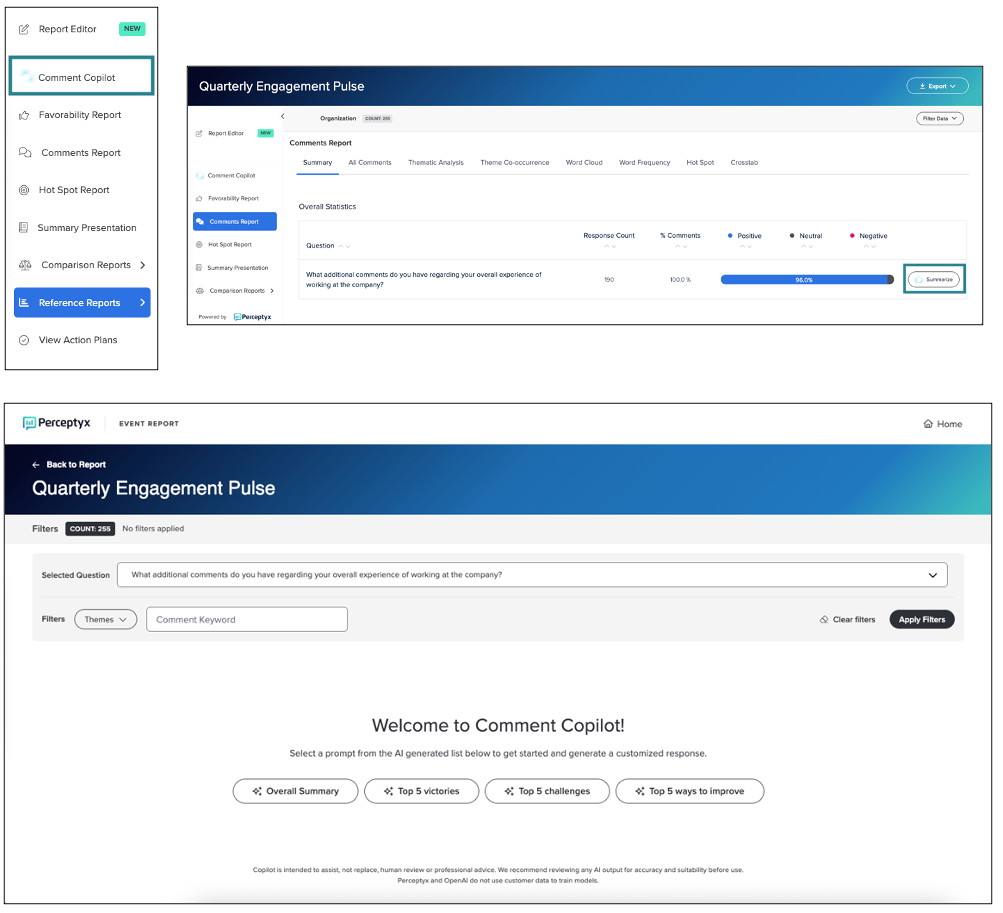
Comment Copilot and Narrative Analysis Agent are now accessible directly within Advanced Reporting for self-led listening events. This enhancement expands access to AI-powered comment analysis, allowing Event Administrators and Creators to explore open-text feedback without leaving the reporting experience.
What’s New
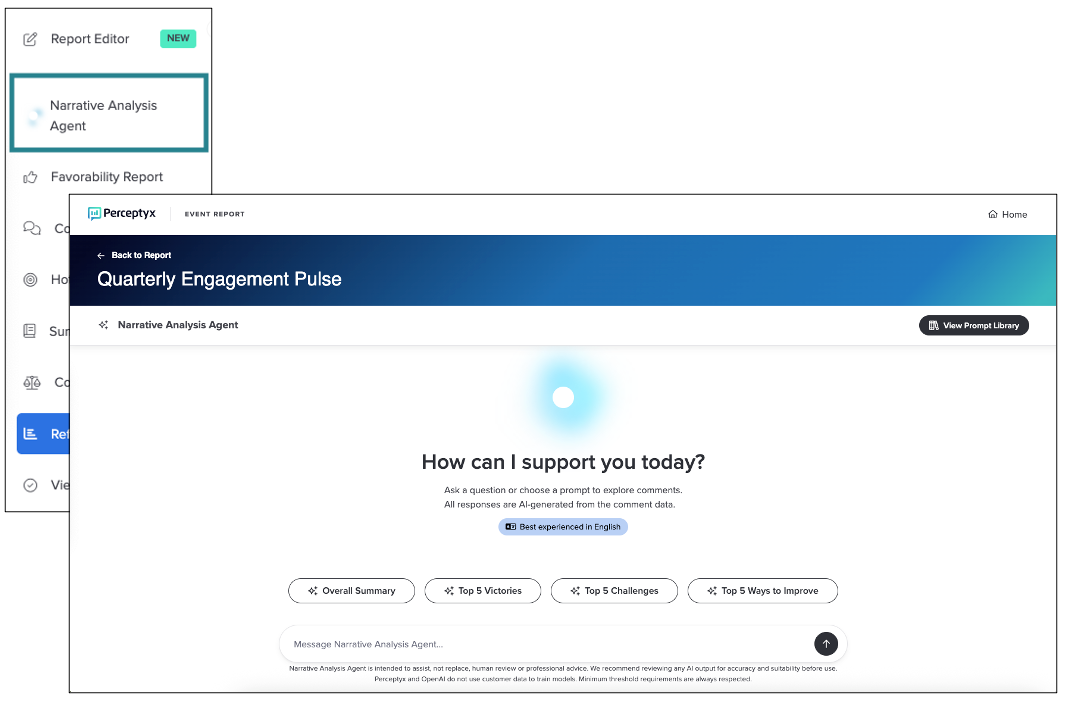
Direct access within reporting: Launch Comment Copilot or Narrative Analysis Agent without leaving Advanced Reporting.
New entry points for question-level analysis: For Comment Copilot, generate summaries for specific questions directly from the Comments Report or select questions within Copilot.
Consistent functionality: Both features maintain their existing capabilities, including Copilot’s prompt-based summaries and Narrative Analysis Agent’s conversational, exploratory analysis.
Flexible enablement: Features are enabled at the subscription level and can be turned on or off for individual listening events.
How it Works
Event Administrators and Creators can launch Comment Copilot or Narrative Analysis Agent directly from within Advanced Reporting, depending on which feature is enabled for their organization and event.
Comment Copilot: Summarizes the currently selected comment question based on the filtered set of responses; demographic filters must be managed in Advanced Reporting, while theme filters and keyword searches can be applied within Copilot.
Narrative Analysis Agent: Enables conversational analysis using natural-language questions, allowing users to explore themes, compare groups, and refine results dynamically without applying predefined filters.
Feature availability: Organizations can enable either Comment Copilot or Narrative Analysis Agent, with access controlled at both the subscription and event level.
Consistent access during transition: These features remain available in Analytics Studio for a limited time as access is consolidated into Advanced Reporting.
Comment Copilot
Narrative Analysis Agent
For more details and step-by-step instructions, see the Use Comment Copilot and Use Narrative Analysis Agent Knowledge Base articles.
User Roles: All Activate Users
Required Subscription(s): Platform, Activate, 360 Feedback
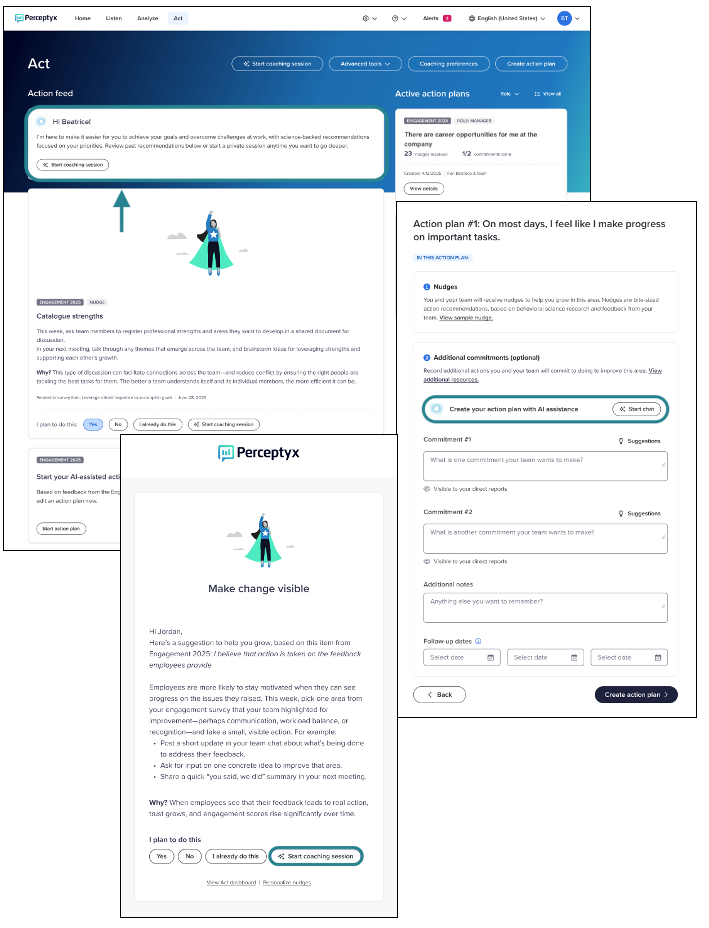
Minor UI updates have been made to how AI coaching is presented across the platform. These updates are informational only and do not affect functionality, permissions, configurations, or user workflows.
What’s New
References to AI Coach have been updated to use AI coaching.
Button labels and supporting text have been updated to better reflect the existing coaching experience.
How it Works
Users access AI coaching in the same way as before, including from existing workflows and prompts.
Coaching remains an opt-in, chat-based experience.
No administrative action is required.
All existing settings and permissions continue to apply.
User Roles: Platform Admin
Required Subscription(s): Platform, Point-In-Time/Lifecycle
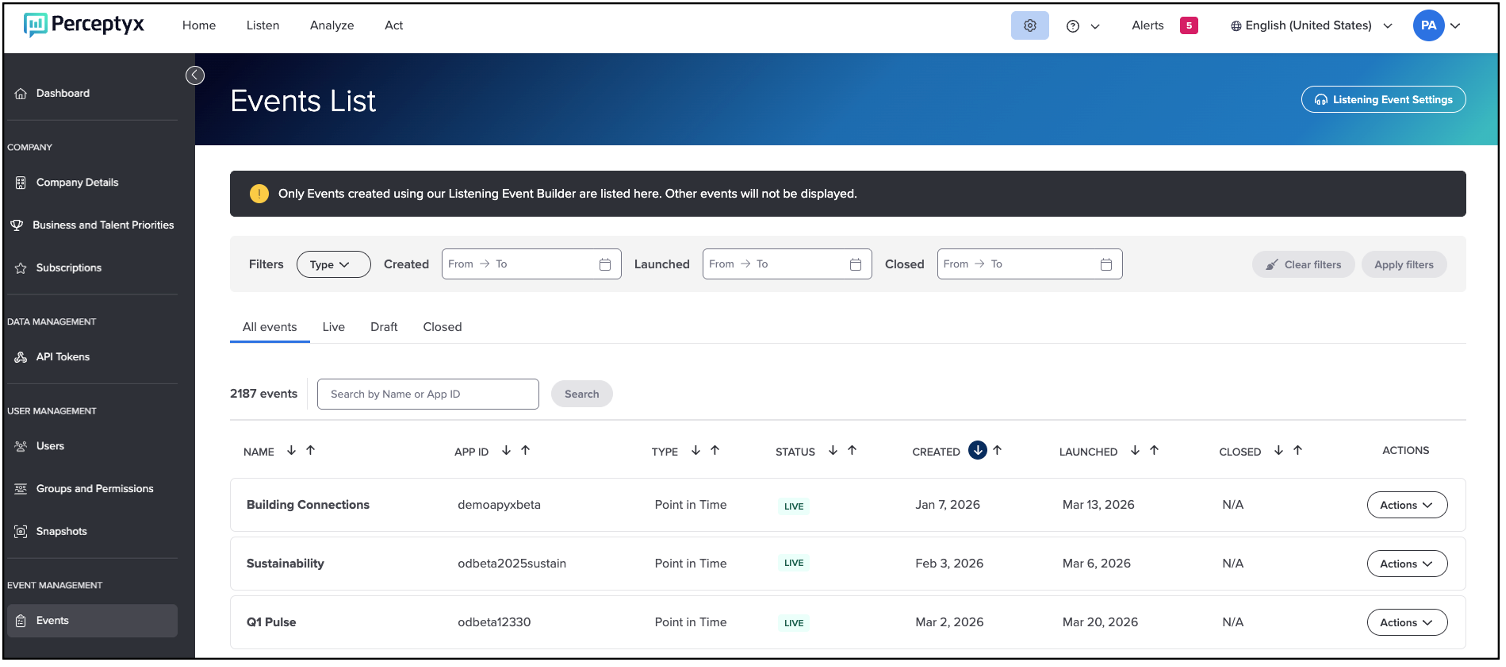
The new Event Management area in the Admin Portal is designed to support organization-wide oversight of listening events for Platform Administrators. It provides a centralized place to audit Perceptyx-led and self-led events and validate access without navigating into each event individually.
Note: This feature currently supports Point-In-Time and Lifecycle events only.
What’s New
The Admin Portal now includes a dedicated Event Management experience that improves visibility into listening events across the organization. This update introduces centralized access to event information.
With this release, Platform Administrators can now:
View all Point-In-Time and Lifecycle listening events in a single, organization-wide list
Quickly locate events using filters and search
Review event configuration details for auditing and validation
How it Works
Event Management is available from the Admin Portal and opens to an Events List that displays all Point-In-Time and Lifecycle listening events across the organization.
From the Events List, Platform Administrators can:
Filter events by type, status, or key dates
Search for events by name or appID
Open event details for audit and review
For more details and step-by-step instructions, see the For more details and step-by-step instructions, see the Event Management (Platform Admins Only) | Point-In-Time & Lifecycle Knowledge Base article.
Questions?
If you have questions about the Perceptyx Platform functionality or the latest updates, please reach out to the Customer Care Team or your Customer Success Manager.
Was this article helpful?
That’s Great!
Thank you for your feedback
Sorry! We couldn't be helpful
Thank you for your feedback
Feedback sent
We appreciate your effort and will try to fix the article