In this update, you’ll find high-level summaries of the latest platform features and enhancements. We’ve also included links to Knowledge Base articles for detailed instructions on how to make the most of these updates.
Unless otherwise noted, the following features support Perceptyx Platform 2.5 and are available based on permissions and subscriptions purchased.
Come explore the new features in our platform workspaces:
We’d love to hear your thoughts on these new features and improvements. Share your feedback with us!
Embedded Images in Listening Event Builder Emails
Enhancement
Who: Event Administrators, Event Creators | Requires: Platform/Point-In-Time/Lifecycle | Availability: Automatically Enabled
Give recipients a more seamless email experience with embedded images. When building listening event emails, you can now embed images directly in the message, helping them display more reliably across a wider range of email clients.
Highlights
Embed images directly in emails: Add images that are included within the email itself, helping recipients view them without needing to download external content.
Improve email presentation: Embedded images help emails appear more polished and complete, particularly for recipients using email clients with stricter image-display settings.
Flexible image handling: Choose between embedded images and externally hosted images when designing email communications.
Learn More: Create and Test Your Listening Event Communications | Point-In-Time & Lifecycle Knowledge Base article.
Conversational Listening for Additional Event Types
Enhancement
Who: Participants | Requires: Platform/Point-In-Time/Lifecycle | Availability: Configured by Perceptyx
Use Conversational Listening across more critical moments in the employee journey. Instead of being limited to exit events, Conversational Listening can now support a broader range of listening scenarios, making it easier to gather qualitative feedback through a consistent conversational experience.
Highlights
Expanded listening coverage: Conversational Listening can now be applied across more listening events and employee milestones, including onboarding, anniversaries, pulse surveys on well-being, M&A, and more.
Event-aware conversations: The conversational experience automatically adapts to the selected event type, using prompts and follow-up questions designed for that listening scenario.
Consistent participant experience: Participants engage through the same conversational interface regardless of event type, creating a familiar experience across listening programs.
Learn More: Participate in a Conversational Listening Event Knowledge Base article.
Expanded Language Support for Listening Events
Enhancement
Who: Event Administrators, Event Creators, Respondents | Requires: Platform, Point-In-Time/Lifecycle | Availability: Automatically Enabled
Reach more employees worldwide with expanded language support. Listening events now support 97 languages across respondent-facing communications and survey experiences, making it easier for global organizations to engage employees in their preferred language.
Highlights
Expanded language coverage: Available survey languages increased from 45 to 97 across Point-in-Time and Lifecycle listening events.
Localized survey experience: Respondent-facing survey elements, emails, and system messages are available in the newly supported languages.
Built-in translation workflow: Use machine translation as a starting point for survey content while continuing to review and manage translations through the existing Manage Translations workflow.
Expanded support for right-to-left languages: Additional RTL languages are now supported, providing a more natural experience for respondents who read right-to-left languages.
Learn More: Supported Languages List
Test Lifecycle Event Sensors Before Launch
Enhancement
Who: Event Admins, Event Creators | Requires: Platform, Lifecycle | Availability: Automatically Enabled
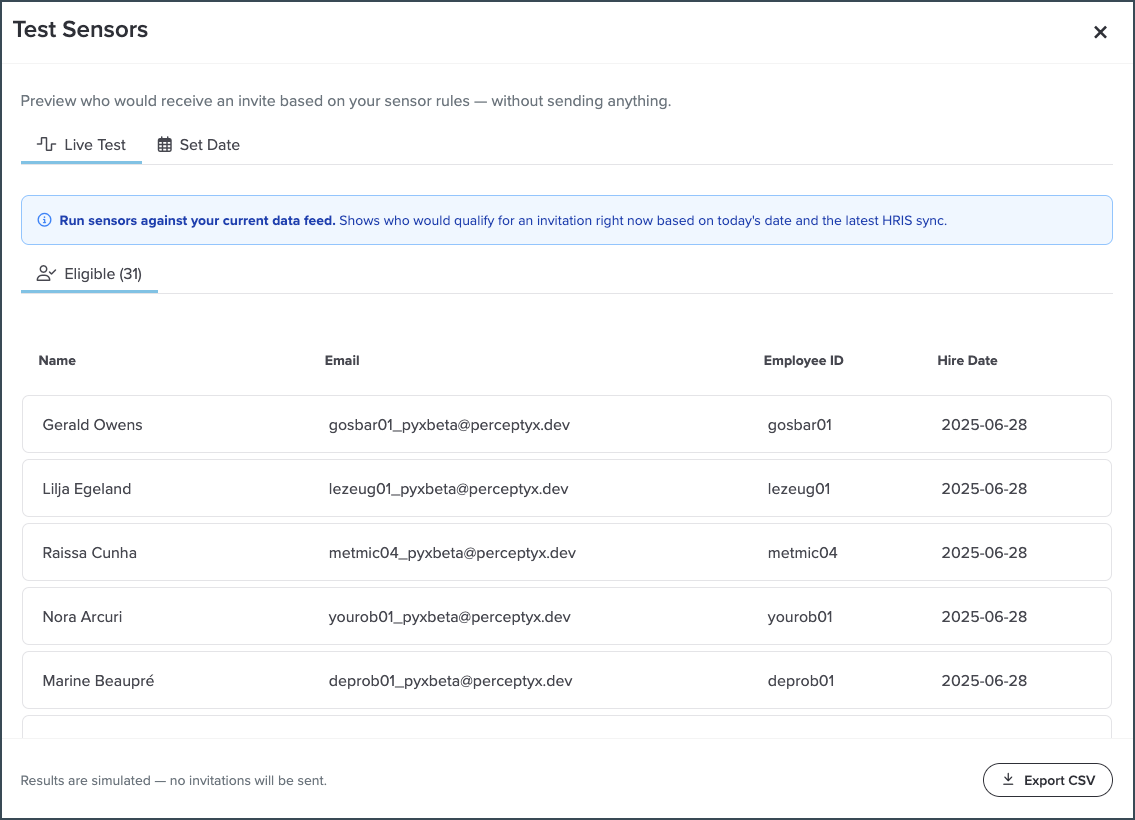
Launch lifecycle listening events with greater confidence by verifying your sensor configuration first. The Test Sensors feature lets you verify that your sensor configuration identifies the correct employees before your event goes live. Preview who would receive an invitation without sending emails or affecting eligibility, so you can validate your setup before launch.
Highlights
Preview invitation eligibility: Run Live Test to see which employees currently meet your sensor criteria based on your latest HRIS data.
Validate date-based sensors: Use Set Date to verify milestone-based or rolling conditions, even when no employees currently qualify for an invitation.
Launch with confidence: Review and export simulated results to confirm your sensor configuration before activating your event.
Learn More: Add Participants | Point-In-Time & Lifecycle Knowledge Base article.
Third-Party Comments Dashboard
New Feature
Who: Event Administrators, Event Creators | Requires: Platform | Availability: Automatically Enabled
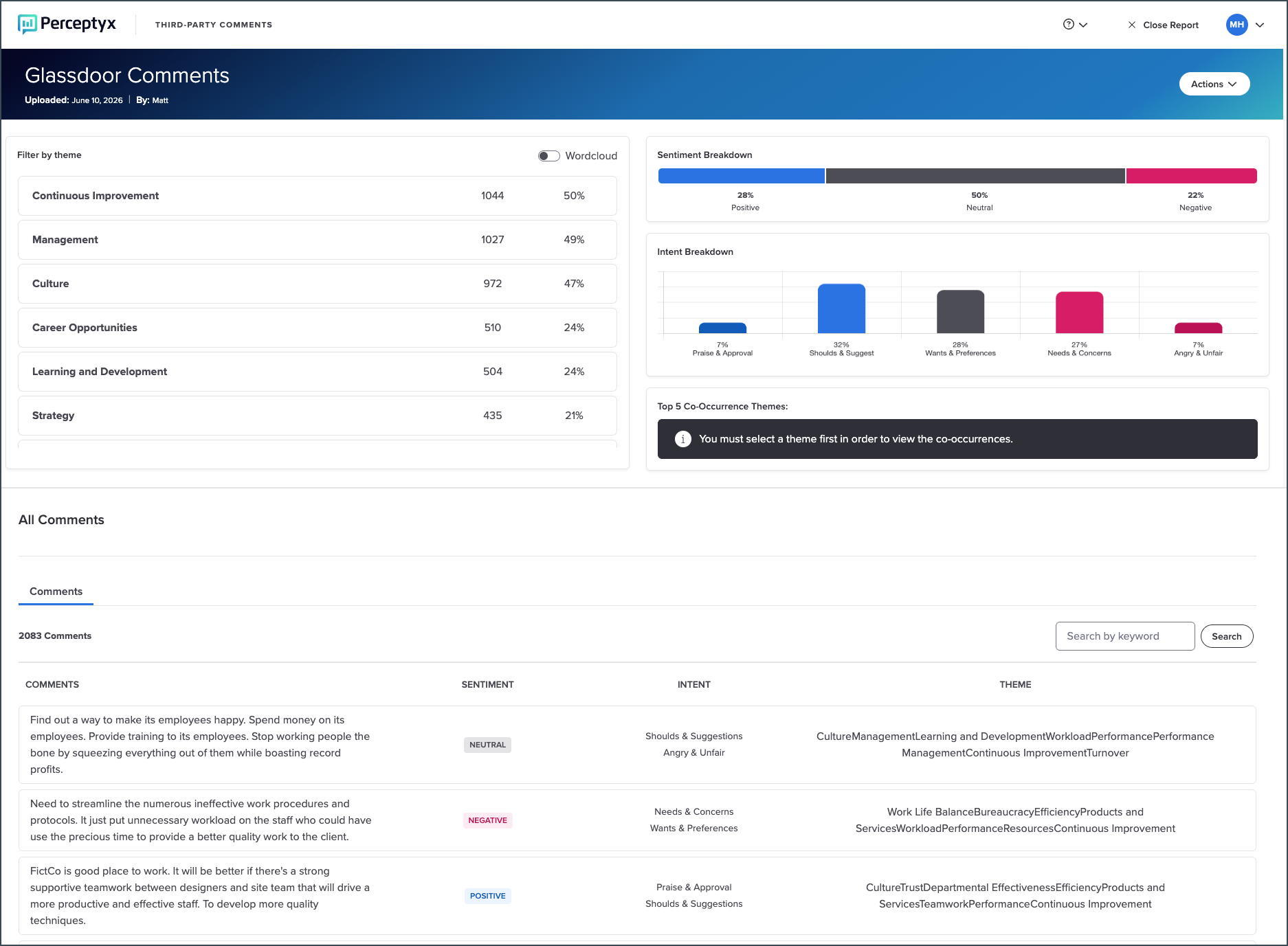
Analyze external comments more efficiently and uncover patterns faster with an interactive dashboard. The Third-Party Comments Dashboard transforms uploaded external comment data into a visual analysis experience. Instead of reviewing a spreadsheet of processed results, users can explore themes, sentiment, and intent through interactive visualizations and filters. This makes it easier to uncover insights from review sites, social platforms, call transcripts, interview notes, and other external feedback sources.
Highlights
Visualize comment insights: View detected themes, sentiment, and intent through built-in visualizations.
Filter and explore data interactively: Select themes, sentiment, or intent values to refine the dataset and update dashboard results in real time.
Review underlying comments: See the individual comments associated with applied filters, along with their detected themes, sentiment, and intent classifications.
Analyze each upload independently: Every uploaded comment file generates its own dashboard, making it easy to explore multiple datasets separately.
Learn More: Analyze Third-Party Comments Knowledge Base article.
Check back next month!
Check back next month!
Questions?
If you have questions about the Perceptyx Platform functionality or the latest updates, please reach out to the Customer Care Team or your Customer Success Manager.
Was this article helpful?
That’s Great!
Thank you for your feedback
Sorry! We couldn't be helpful
Thank you for your feedback
Feedback sent
We appreciate your effort and will try to fix the article