Develop
Step 2 of the course builder, Audience & Outcomes, asks four questions about who your course is for and what it should achieve. They are the closest thing you have to a design brief, so this is where a good course is won or lost.
This article walks through
Why these four questions matter so much
Your source material tells Develop what the subject is. These questions tell it what to do with the subject: how deep to go, what language to use, which parts to spend time on, and what a finished learner should look like.
The useful way to think about it is that you are briefing a colleague who is about to build this training for you. You would not hand them a manual and say "make a course." You would tell them who it is for and what you need people to be able to do afterward. Same idea, same level of detail.
Your answers do a second job, too. You answer these questions before you add any source material, and if you use the web search in the next step, it searches based on what you write here. Clear answers get you better sources as well as a better course. More on that in Find Web Sources for Your Course.
The first two questions are required. The last two are optional, and answering them is one of the cheapest upgrades available to you. Each box shows a sample answer in grey to give you an idea of what to write.
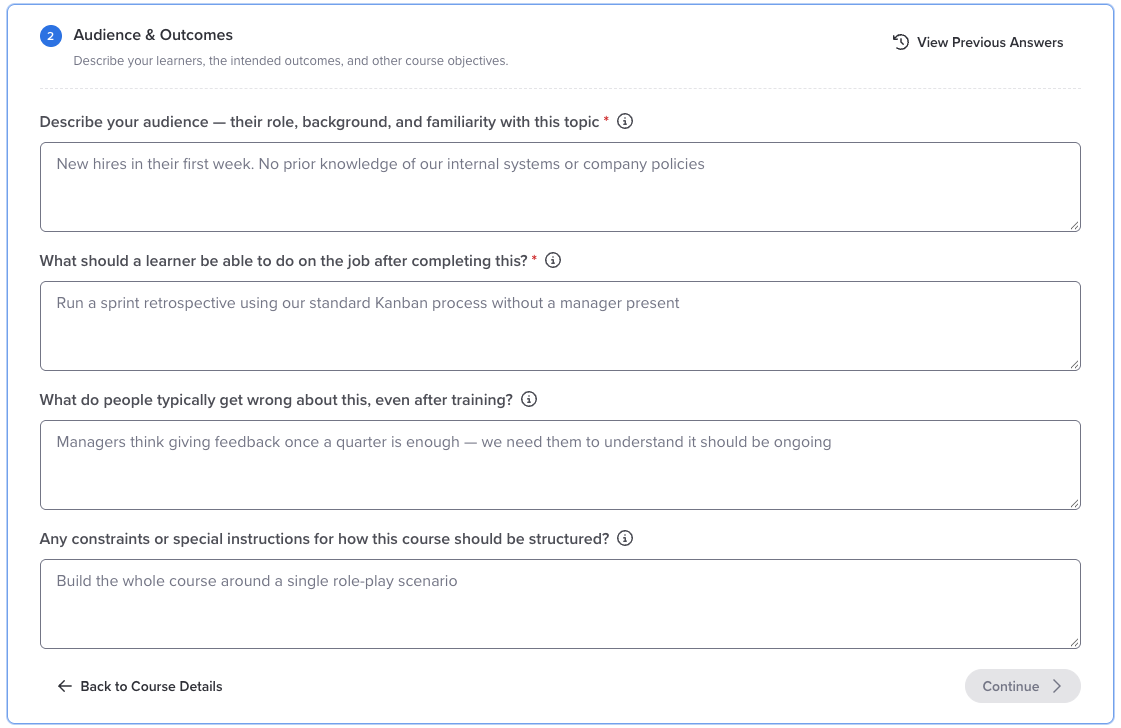
1. Who is the audience?
Their role, their background, and how much they already know about this topic. Develop uses your answer to set the reading level, decide what it can assume people already understand, and choose the kinds of scenarios it builds. Vague in, vague out.
Instead of: "Managers across the organization."
Try: "Frontline managers in retail stores, promoted from the floor. Comfortable running a team day to day, but no formal training on performance conversations or documentation."
2. What should a learner be able to do on the job afterward?
This is the important one. Develop works backward from your answer to design the whole course, so notice the word "do." Knowing something and being able to do it produce very different courses, and only one of them shows up in someone's actual work.
Instead of: "Understand how to handle difficult conversations."
Try: "Navigate a conversation with an underperforming employee: address the behavior, set a clear expectation, and document the outcome."
If there is more than one outcome, list them all. Develop uses that list to work out how many modules the course needs, and the web search checks its sources against each one.
3. What do people get wrong, even after training? (optional)
This is where you hand over everything you have learned from watching people struggle with this topic. It tells Develop where to push harder. Stick to actual mistakes and misconceptions rather than frustration about attitude, because Develop can teach around a mistake but it cannot teach around "they do not care."
Instead of: "They don't understand the policy."
Try: "People understand the rule but apply it to situations it does not cover, and escalate cases they actually have the authority to decide."
4. Any constraints or special instructions? (optional)
This is your steering wheel. Use it for anything Develop could not work out on its own:
- Format: "Build this as a roleplay where the learner plays the manager."
- Scope: "One module only," or "three modules, one per stage of the process."
- How to use your sources: "Teach from the process guide. Treat the other sources as background context only."
- Company context: anything about how your organization works that is not written down in your documents.
Heads up
These boxes are instructions, not private notes. What you write here shapes the conversation your learners have, so keep real names and confidential specifics out of them, the same way you would with an uploaded file.
When you are ready
- Click Continue to move on to step 3, Source Material, where you upload your own files, search the web for sources, or both.
- On step 4, Review & Create, check the summary and click Create Course.
Develop builds the course in the background, usually in two to five minutes. You can close the tab and come back.
Changing your answers
Until you create the course, you can come back to these questions at any time. Click Edit on the Audience & Outcomes step, or click Edit next to the audience or outcome on the Review step.
If you have already searched the web
The web search runs from these answers, so this is the place to fix results that are not right. Changing your answers does not rerun the search on its own. When you go back to Source Material, your earlier results are greyed out and marked as out of date with your inputs. Click Find New Sources to search again with your new answers.
If the course is not what you hoped for
Build a new one with better answers rather than patching the old one. Sharpening questions one and two usually produces a dramatically different result, and it only costs you a few minutes. Treat your first attempt as a draft and you will get where you want to go faster.
What's next
Add your source material in step 3. Prepare Your Content and Create Your Course walks through the rest of the builder, and Find Web Sources for Your Course covers the web search.
Was this article helpful?
That’s Great!
Thank you for your feedback
Sorry! We couldn't be helpful
Thank you for your feedback
Feedback sent
We appreciate your effort and will try to fix the article