Act
A 360 feedback report shows you how the people around you see your work. Activate helps you do something with it, with a suggested development plan, regular nudges, and coaching whenever you want it.
In a 360 feedback event, managers get feedback from the people who work with them most, like peers, direct reports, and their own manager. Those people are called raters, and the manager answers the same questions about themselves. Once everyone has submitted and the report is ready, Activate takes it from there.
Reading a report is one thing. Changing how you work because of it is harder, and that's the gap Activate is built to close. Everything in this article happens on the Act page and in tools you already use, so there's nothing new to learn your way around.
Not sure what you have
Activate is set up a little differently for every organization. Things like where nudges come from and whether coaching is turned on can vary. If you're not sure what's included for your company, your Perceptyx contact can tell you.
This article walks through
Your development plan
A 360 report can cover a lot of ground, and the hardest part is often picking where to start. Activate looks at your results and suggests the survey items most likely to make a difference, so you start with a short list instead of the whole report.
When your 360 feedback report is ready, you'll see a prompt on the Act page to start your plan. Depending on how your company is set up, the same prompt can also arrive by email, Microsoft Teams, or Slack.

Click Start Action Plan to see the recommended items. Each one shows your own score next to your overall score from raters, so you can see where your view and theirs line up.
Pick one or more of the recommendations, or open the full list of survey items and choose your own. Then build out the plan:
- Add up to two commitments.
- Write any notes you want to keep with the plan.
- Choose up to three follow-up dates.

If coaching is turned on for you, click Start chat to talk through what to put in the plan. There's more on that in the On-demand coaching section below.
Every plan you create starts sending you Intelligent Nudges to help you follow through. Plans from a 360 feedback event are about your own development, so these nudges go to you rather than to your team.
Good to know
Your organization sets a window for action planning. If you haven't created a plan by the time it closes, Activate creates two for you from your top recommended items, so the nudges still start. You can still create your own plans after that.
For the full walkthrough, see Create an Action Plan.
Intelligent Nudges
Writing a plan is the easy part. Remembering it a few weeks later is harder. Intelligent Nudges are short, personalized suggestions, grounded in behavioral science, that help you build the habits behind your plan.
Nudges arrive on a regular schedule in the Action Feed on the Act page, and in the tools you already work in, like email, Microsoft Teams, or Slack. The first line of each nudge tells you what it's connected to, like the survey item from your plan or a personal focus area you picked. After that comes the suggestion itself and a short explanation of why it works.

Only plans from your most recent 360 feedback event send nudges, so plans from older 360 events don't keep going.
Reacting to a nudge
Every nudge has an I plan to do this row with Yes, No, and I already do this. Clicking one tells Activate what's useful, and it uses that to tune the nudges you get next. If coaching is turned on, there's also a Start coaching session button for talking through how to put the nudge into practice.
Coaching preferences
You can personalize your nudges further. Click Coaching Preferences on the Act page to answer a few optional questions about how your work is set up, and pick up to three personal focus areas.

See Set Coaching Preferences for the steps.
Finding your nudges later
Your Action Feed keeps every nudge, newest first. It shows nudges and action plan prompts from all of your listening events, not just the 360 feedback event, so you'll see everything in one place.

Each card under Active Action Plans also shows how many nudges you've received for that plan. Click View Details on a card to see that plan's nudges, newest first.

For more on working with nudges, see Interact with Intelligent Nudges.
Tools for admins
Admins can shape the nudges people get. You'll find these under Advanced Tools on the Act page.
- Custom Learning Links. Attach links to your own resources, like learning courses, career tools, or a benefits portal, so they show up right inside nudges. See Add and Manage Custom Learning Links for Nudges (Admins Only).
- Nudge Generator. Turn your existing learning and development material into nudges you can review and edit, so training sticks after the session ends. See Creating Nudges with Nudge Generator (Admins Only).
- Campaigns. Send a focused set of nudges to a group you choose, for a period you set, to back a specific priority. Campaign nudges rotate into the usual schedule, so nobody gets more nudges than normal. See Create and Manage Campaigns.
On-demand coaching
When coaching is turned on for you, you can start a coaching session any time. It's a chat window for making sense of your feedback, getting ready for a hard conversation, or figuring out what to put in your development plan. The guidance is grounded in behavioral science and in your own 360 results, so it's specific to you.
Type a question into the Message Activate box, or click one of the suggested prompts to get started. You can rate any response with a thumbs up or thumbs down, which helps tailor future sessions.

Coaching works in about 60 languages with no setup. Just write in the language you're most comfortable with.
Turned on per person
Coaching is turned on for specific people in your organization. If you'd like access, check with your admin.
For the full walkthrough, see Use On-Demand Coaching.
Tracking engagement in Act Metrics
Act Metrics shows whether development plans, nudges, and coaching are actually being used across your 360 feedback program. Open it from Advanced Tools on the Act page.
What you'll see
Act Metrics shows different sections depending on your role and permissions, so you may not see everything described here.
Action plan engagement
Pick your 360 feedback event from the selector at the top of this section to see the survey items people chose most often for their plans and a participation breakdown. You can also search for a specific person's plan and download the action planning data as a spreadsheet.

Nudge engagement
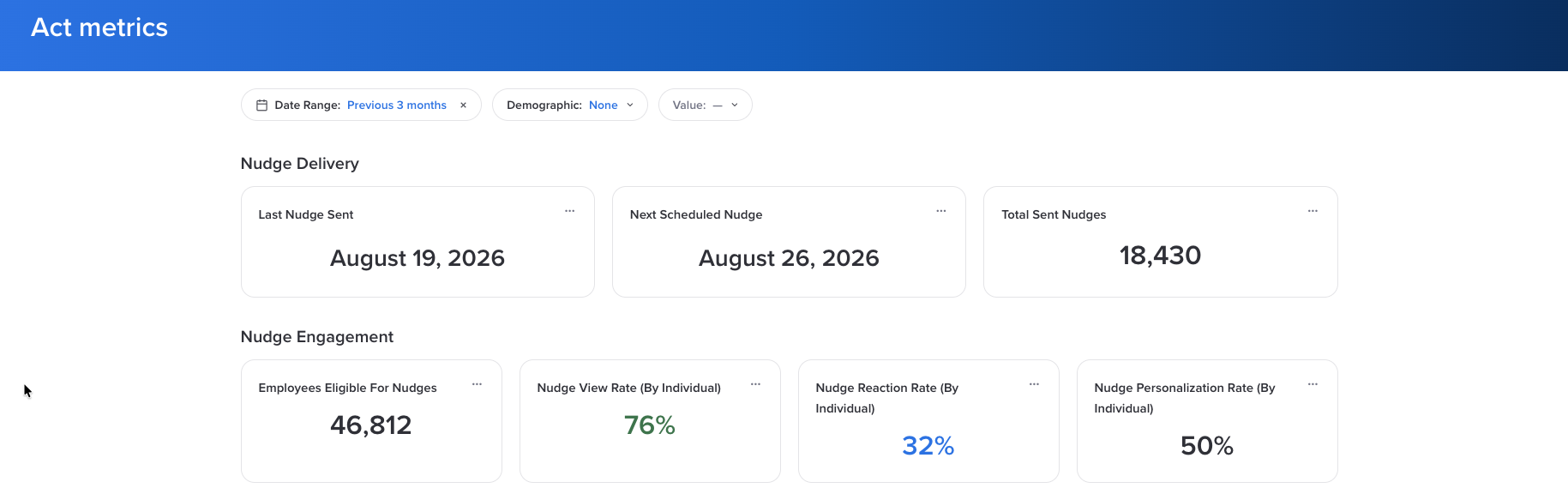
Filter by date range and by any demographic, then check when nudges went out, how many people viewed or reacted to them, how view rates are trending, and which behaviors people are being nudged on most.
Coaching engagement
If coaching is turned on, Act Metrics shows how many employees chatted with Activate and how many conversations they started. This section always covers the last 90 days.

For a full tour of the dashboard, see Act Metrics Dashboard.
What's next
Ready to start? Create an Action Plan walks through building your plan step by step, and Activate Overview covers how Activate works across all your listening events.
Was this article helpful?
That’s Great!
Thank you for your feedback
Sorry! We couldn't be helpful
Thank you for your feedback
Feedback sent
We appreciate your effort and will try to fix the article