In this update, you’ll find high-level summaries of the latest platform features and enhancements. We’ve also included links to Knowledge Base articles for detailed instructions on how to make the most of these updates.
Unless otherwise noted, the following features support Perceptyx Platform 2.5 and are available based on permissions and subscriptions purchased.
Come explore the new features in our platform workspaces:
We’d love to hear your thoughts on these new features and improvements. Share your feedback with us!
Check back next month!
Check back next month!
Check back next month!
➡️ Group-Based Access & Permissions: New Platform Admin Group
User Roles: Platform Admin
Required Subscription(s): Platform, Point-In-Time/Lifecycle
Group-Based Access and Permissions now includes a Platform Administrator protected group, providing a system-defined way to manage platform-level administrative access using the same group-based model as other protected roles.
Note: This feature applies to Listening Event Builder user access for Point-In-Time and Lifecycle; it does not apply to 360 or Crowdsource.
What’s New
A new Platform Administrator protected group is available in the Groups and Permissions section of the Admin Portal.
This group:
Is preconfigured with fixed Platform Administrator permissions
Supports direct user assignment
Cannot be cloned
How it Works
The Platform Administrator protected group appears along with the Event Administrator and Event Creator protected groups in the Groups and Permissions screen.
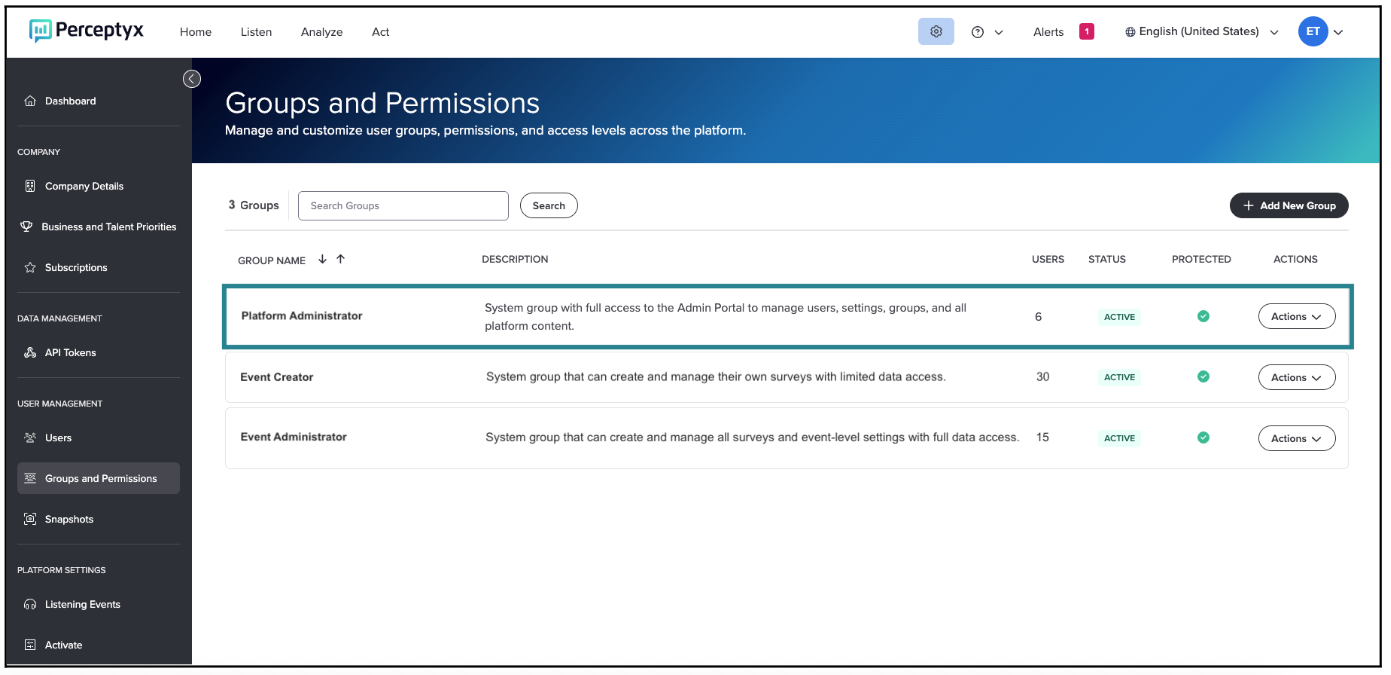
Platform Administrators can assign or remove users as needed, but the group’s permissions are fixed and cannot be modified. Unlike other protected groups, the Platform Administrator group cannot be cloned, ensuring a single authoritative group for platform-level administration.
For more details and step-by-step instructions, see the Manage Group-Based Access and Permissions (Platform Admins Only) Knowledge Base article.
Questions?
If you have questions about the Perceptyx Platform functionality or the latest updates, please reach out to the Customer Care Team or your Customer Success Manager.
Was this article helpful?
That’s Great!
Thank you for your feedback
Sorry! We couldn't be helpful
Thank you for your feedback
Feedback sent
We appreciate your effort and will try to fix the article