In this update, you’ll find high-level summaries of the latest platform features and enhancements. We’ve also included links to Knowledge Base articles for detailed instructions on how to make the most of these updates.
Unless otherwise noted, the following features support Perceptyx Platform 2.5 and are available based on permissions and subscriptions purchased.
Come explore the new features in our platform workspaces:
We’d love to hear your thoughts on these new features and improvements. Share your feedback with us!
User Roles: Admin, Creator
Required Subscription(s): Point-In-Time & Lifecycle
The email communication experience in the Event Builder has been updated to give users earlier access and more design flexibility. Email creation and testing now take place in a new Communications phase, which is positioned between the Invite and Settings phases.
What’s New
New Communications Phase
You can now create, customize, and test your invitation and reminder emails in a dedicated Communications phase. This helps streamline planning and gives you more time to refine your emails before scheduling them for delivery in the Launch phase.
New Customization Options
You can now personalize emails with two new visual enhancements:
Banners – Upload a banner image (JPEG or PNG, max 200 KB) to appear at the top or bottom of the email.
Background Color – Set a custom color for the email background.
How it Works
You’ll now create and customize your email communications in the new Communications phase, which appears between the Invite and Settings phases in the Event Builder.
From this phase, you can:
Choose or create an email template (Invitation or Reminder)
Add a banner image (top or bottom) and select a background color
Edit your content using the existing formatting toolbar or HTML source view
Send yourself a test email to preview the message
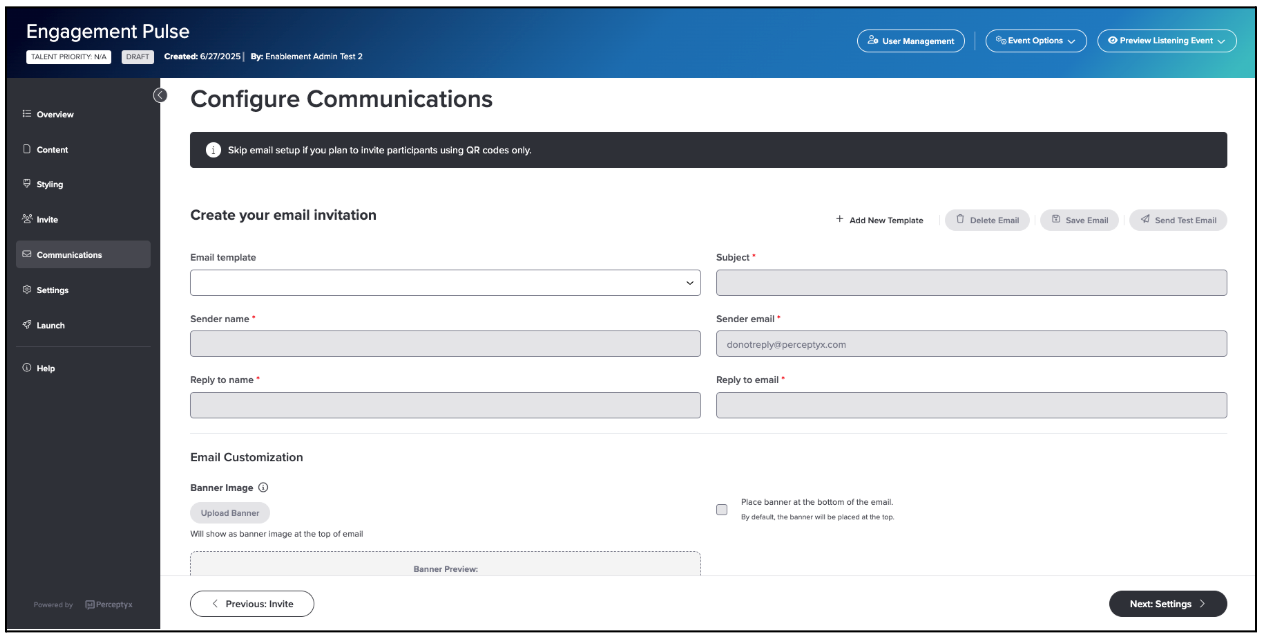
When you're ready, schedule your email delivery in the Launch phase.
For more details and step-by-step instructions, see the Create and Test Your Listening Event Communications | Point-In-Time & Lifecycle Knowledge Base article.
User Roles: Admin, Creator
Required Subscription(s): Point-In-Time
Early adoption will begin on December 10, 2025. If you are interested, click here.
Narrative Analysis Agent is a new AI-powered tool in Analytics Studio that helps you explore open-ended comments from closed Point-In-Time listening events using natural-language questions. While Comment Copilot offers quick summaries using predefined prompts, Narrative Analysis Agent supports a more flexible, conversational experience ideal for digging deeper into the “why” behind employee feedback.
What’s New
With Narrative Analysis Agent, you can:
Ask open-ended, natural-language questions
Receive tailored, AI-generated responses and insights
Drill into specific themes, departments, or demographics
Surface representative verbatim comments for added context
Use the Prompt Library for predefined exploration ideas
Ask follow-up questions to deepen your analysis
This flexible approach helps reduce analysis time and uncover insights aligned to your organization’s unique needs.
Note: Your organization can enable either Narrative Analysis Agent or Comment Copilot, but not both.
How it Works
Once enabled, Narrative Analysis Agent appears in the left panel of the Analytics Studio workspace and is available for closed Point-In-Time projects.
To get started, open a project and launch the agent. From there, you can:
Choose a suggested prompt, like Top 5 Challenges or Overall Summary, or enter your own natural-language question.
Use follow-up questions to explore specific themes, compare across groups, or request supporting examples.
Access the Prompt Library to apply predefined prompts without refreshing the page and disrupting your existing conversation.
The agent uses generative AI (via the OpenAI API) to analyze both open-ended comments and demographic metadata, producing context-aware responses tailored to your questions.
To protect respondent privacy, built-in safeguards automatically mask names in the data and apply minimum response thresholds to prevent unintended attribution.
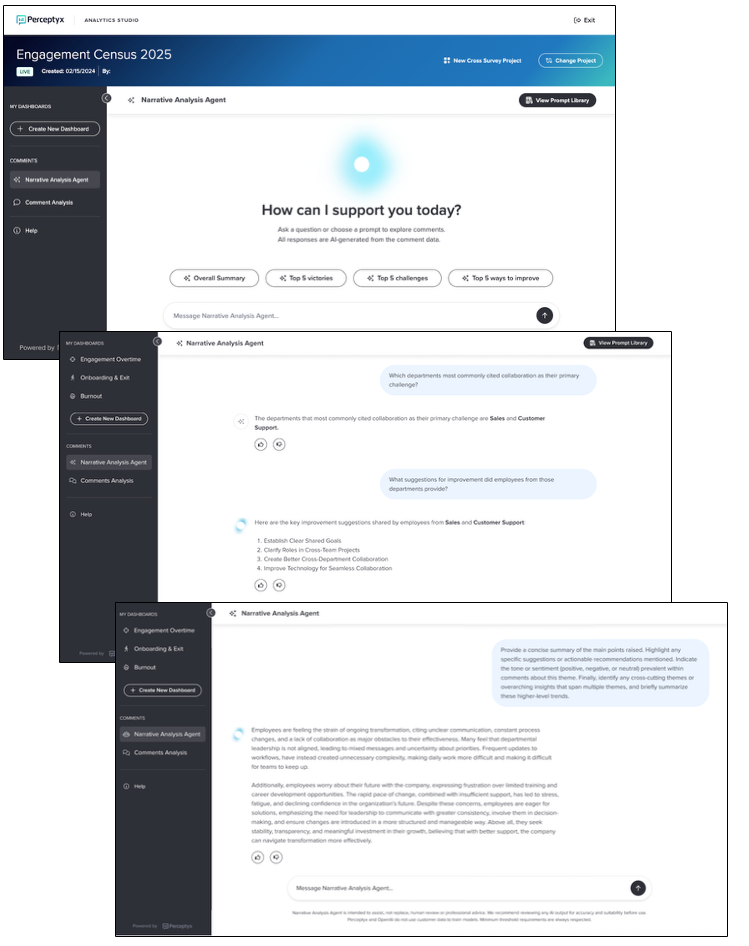
For more details and step-by-step instructions, see the Use Narrative Analysis Agent Knowledge Base article.
Check back next month!
Check back next month!
Questions?
If you have questions about the Perceptyx Platform functionality or the latest updates, please reach out to the Customer Care Team or your Customer Success Manager.
Was this article helpful?
That’s Great!
Thank you for your feedback
Sorry! We couldn't be helpful
Thank you for your feedback
Feedback sent
We appreciate your effort and will try to fix the article