In this update, you’ll find high-level summaries of the latest platform features and enhancements. We’ve also included links to Knowledge Base articles for detailed instructions on how to make the most of these updates.
Unless otherwise noted, the following features support Perceptyx Platform 2.5 and are available based on permissions and subscriptions purchased.
Come explore the new features in our platform workspaces:
We’d love to hear your thoughts on these new features and improvements. Share your feedback with us!
User Roles: Admin, Creator
Required Subscription(s): Point-In-Time, Lifecycle
We’ve expanded the customization options available when admins/creators add questions to a listening event that invite open text responses. These updates introduce new open text response types, such as an “Other” field and multiple comment formats, to provide greater flexibility and improve the overall survey experience.
What’s New
These enhancements give admins and creators more control over how open text responses are collected and displayed. The new options improve both clarity for respondents and flexibility during question setup.
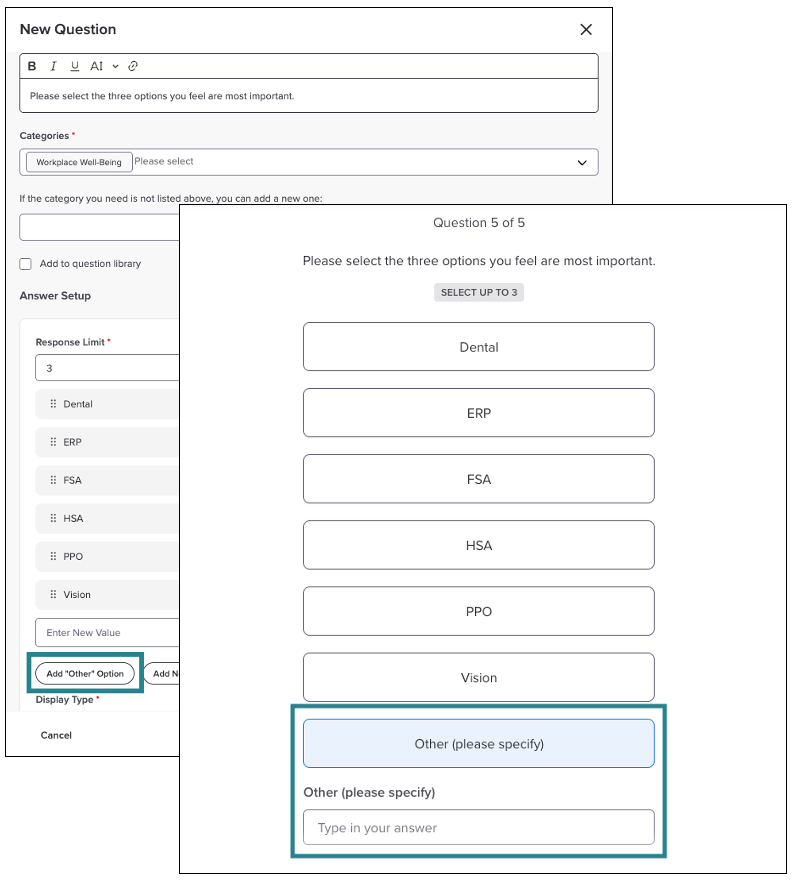
Ability to add an “Other” response option to custom Single Selection and Multiple Choice questions.
Customizable labels for “Other” responses, allowing clearer guidance for respondents.
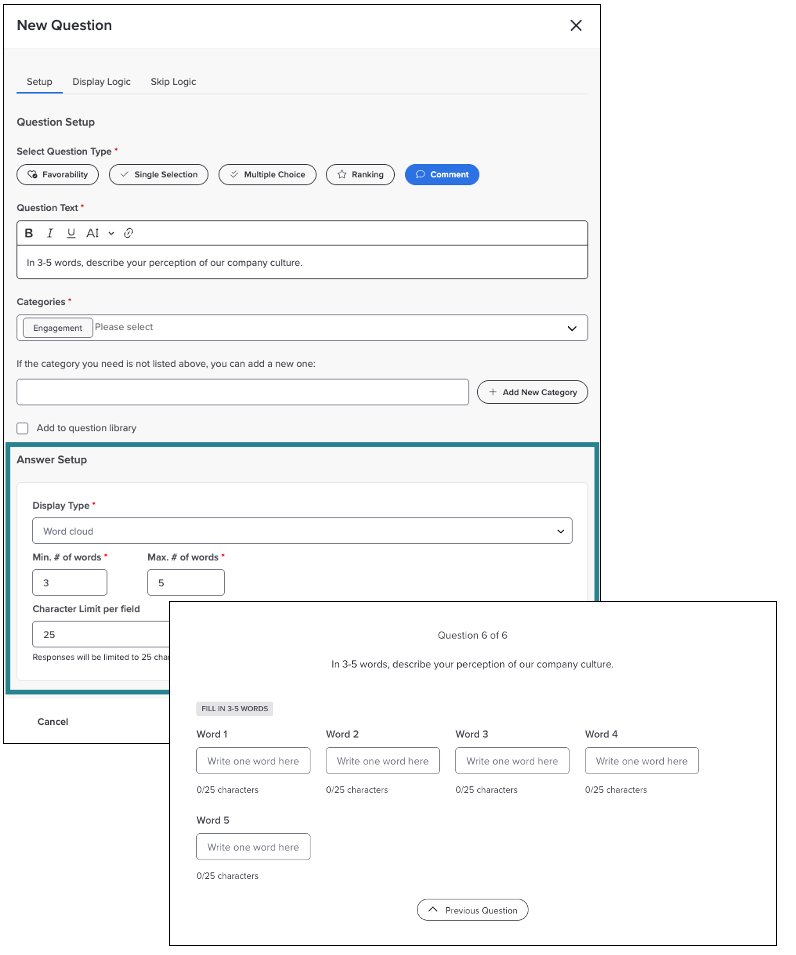
Support for multiple open text formats, including Short Answer, Paragraph Answer, and Word Cloud, for Comment questions.
Updated open text presentation that improves readability for participants.
How it Works
“Other” Response Option for Custom Questions
For Single Selection and Multiple Choice questions:
Add an “Other” response to allow respondents to enter free text when none of the listed options apply.
Customize the “Other” label as needed.
Respondent-entered text is stored with their answer and follows the same required or optional rules as the main question.
Comment Question Open Text Formats for Custom Questions
When adding a Comment question, choose from:
Short Answer: A one line text field with a configurable character limit.
Paragraph Answer: A larger text box suitable for longer responses, with adjustable character limits.
Word Cloud: Multiple short text fields with configurable minimum and maximum word counts and optional character limits per field.
All open text settings are configured directly within the answer setup process.
For more details and step-by-step instructions, see the Add & Manage Questions | Point-In-Time & Lifecycle Knowledge Base article.
User Roles: Admin, Creator
Required Subscription(s): Platform, 360 Feedback
We’ve introduced a new lexical theme set designed specifically for Perceptyx-Led 360 listening events. This enhancement ensures open text feedback from 360 participants is categorized using leadership and development-focused themes, resulting in more accurate insights and more meaningful reporting.
What’s New
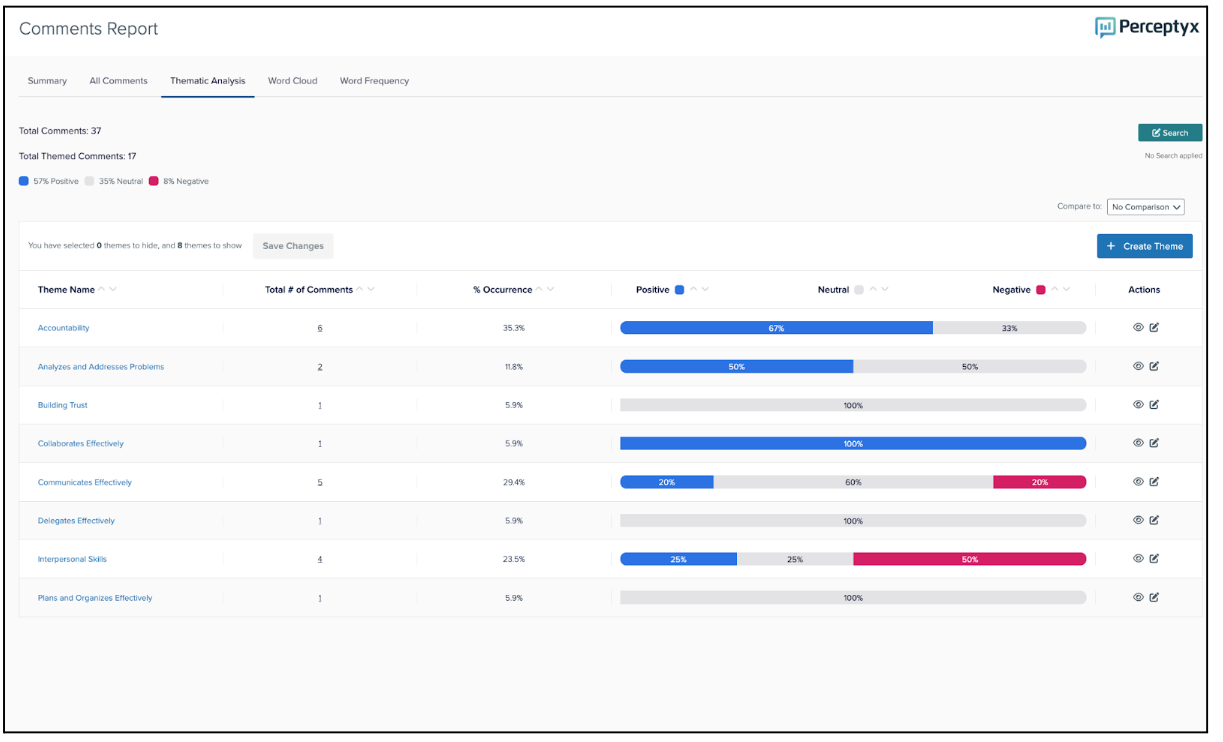
360 Feedback listening events now use a dedicated lexical (custom) theme list that reflects leadership behaviors, interpersonal skills, and development opportunities rather than engagement-focused themes.
These new 360 themes were created and validated by our Workforce Transformation Consulting team. This theme set reflects our best-practice framework for reviewing and capturing 360 feedback. It uses our custom theme detection methodology, allowing you to tailor themes to fit your organization’s needs.
The themes are fully integrated with existing reporting experiences.
The themes are automatically detected and applied to 360 listening events.
There is a clear separation between engagement and 360 themes in the platform experience and in reporting.
How it Works
When the platform identifies a 360 listening event, it automatically applies the 360-specific lexical theme set.
Automatic Theme Assignment: All new 360 listening events automatically use the 360 theme list. Engagement themes are not displayed. Because this is a lexical theme set, users with appropriate permissions can edit or hide individual themes or add their own.
Admin Reporting: Admin dashboards and reports for 360 events show only 360-specific themes by default, enabling clear identification of leadership strengths and development areas at scale.
Note: This enhancement applies only to new 360 Feedback listening events. Existing 360 events are not impacted.
For more details and step-by-step instructions, see the Administrator Dashboard and Reports | 360 and Comments Report Knowledge Base articles.
User Roles: Nudge Recipients
Required Subscription(s): Platform, Activate
Our new Nudge API gives organizations the ability to deliver Intelligent Nudges directly through any application their employees use in their daily workflow. This provides greater flexibility in how nudges reach employees, whether through proprietary apps, HCM dashboards, or frontline engagement tools.
What’s New
These updates expand how customers can surface personalized, data-driven nudges across their existing technology ecosystem. Organizations now have more flexibility to meet employees in the tools they use most.
Nudges can now be delivered through any internal or third-party application, in addition to existing Perceptyx channels.
The Nudge API enables seamless delivery of nudges at scale, supporting ongoing behavior change in the flow of work.
Customers can activate nudges within the context that best fits their workflows and systems.
How it Works
The Nudge API can be called to retrieve the most recent nudge generated for a specific user.
Organizations can use their own applications or other external tools to deliver these nudges, alongside existing Perceptyx delivery channels.
For more information, contact your Perceptyx Customer Success Manager.
User Roles: Admin, HRBP, Leader
Required Subscription(s): Platform
We’ve enhanced the action planning data download available in Act Metrics by adding user demographic information to the existing report. This update gives Admins, HRBPs, and Leaders deeper insight into how different groups across the organization engage with action planning activities.
What’s New
Customers now have greater visibility into action planning participation patterns across demographic groups. This improvement supports more targeted analysis and helps organizations identify trends and opportunities within specific populations.
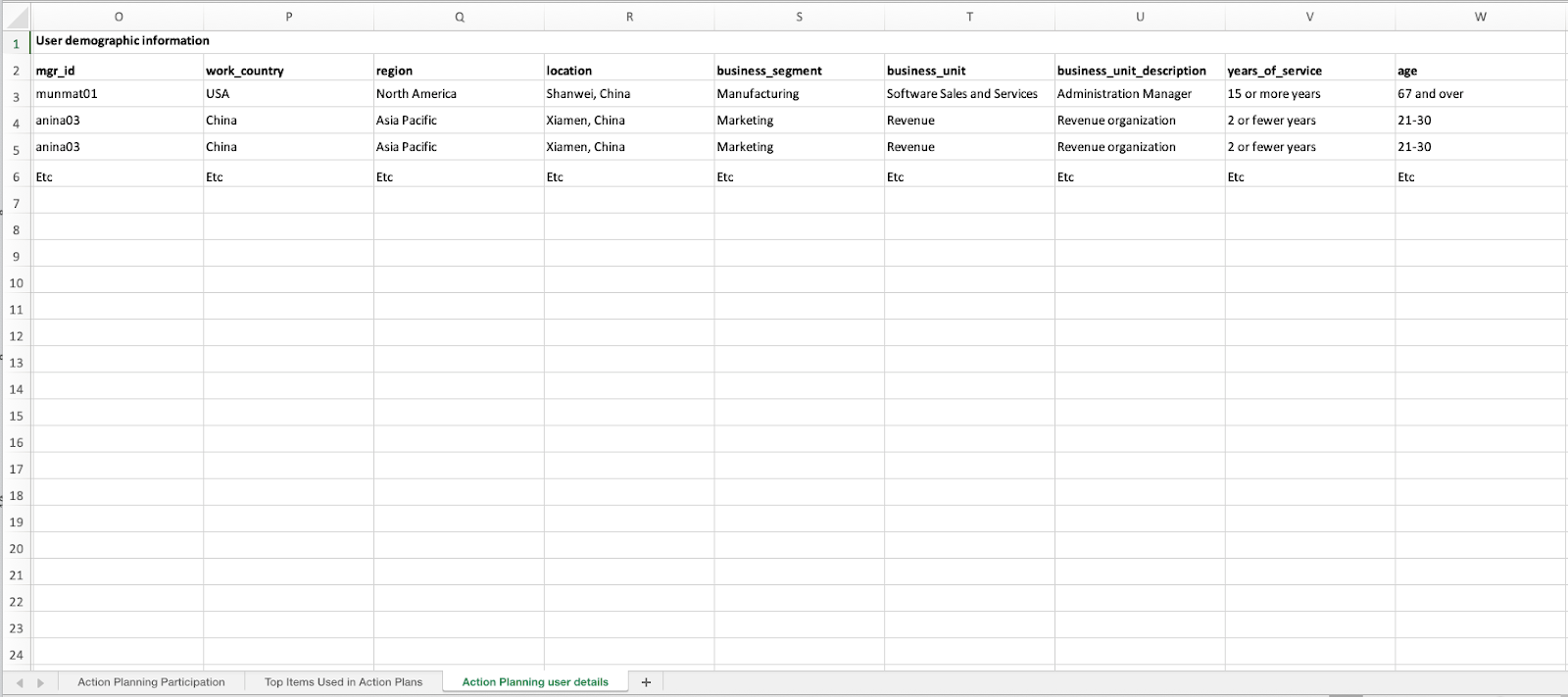
User demographic data is now included in the Action Planning User Details tab of the downloadable report.
Customers can analyze demographic trends using their preferred tools, such as Excel or Tableau.
Expanded insights support more informed decision making and follow-up planning.
How it Works
Users with appropriate permissions can continue to download action planning data for a specific listening event into an Excel file. The file includes multiple tabs with action plan metrics and details.
The Action Planning User Details tab now includes demographic data for each user associated with action planning activity.
This demographic information can be filtered, grouped, or combined with other data in external analytics tools.
All other tabs and existing data remain unchanged.
For more details and step-by-step instructions, see the View Action Plans Knowledge Base article.
Check back next month!
Questions?
If you have questions about the Perceptyx Platform functionality or the latest updates, please reach out to the Customer Care Team or your Customer Success Manager.
Was this article helpful?
That’s Great!
Thank you for your feedback
Sorry! We couldn't be helpful
Thank you for your feedback
Feedback sent
We appreciate your effort and will try to fix the article