Users added to a reporting group do not have access to event reporting until they are activated. There are two ways to activate users:
Use the Activate option for individual users
Use the Send Group Invite option for one or more users (COMING SOON)
When users are activated (either Individual or Group invite), they are sent a report access email notifying them that they have reporting access for the event.
Note: As an admin, you can shadow an inactive user. This allows the admin to confirm the setup looks correct before activating users in the group.

Use the Activate Option
You can use the Activate option to activate individual users.
To activate an individual user:
In the Permissions tab of the Report Editor, click Manage Group for the group you want to work with.
The Assigned Users tab appears.
In the Actions column, click the 3 dot icon for the user you want to activate, then select Activate.
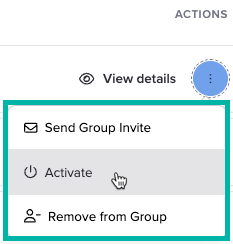
The user’s status changes from Inactive to Active.

What’s Next
Was this article helpful?
That’s Great!
Thank you for your feedback
Sorry! We couldn't be helpful
Thank you for your feedback
Feedback sent
We appreciate your effort and will try to fix the article